Gmail: Create a Google Apps Alias
Sign in to the Google Admin console Go to the user’s account page. On the user’s account page, click Account. In the Aliases section, click Add an alias. In the Add an alias text box, enter the user name. (This

Sign in to the Google Admin console Go to the user’s account page. On the user’s account page, click Account. In the Aliases section, click Add an alias. In the Add an alias text box, enter the user name. (This
Log into your webmail. If you work at XYZ Corp and your website is www.xyzcorp.com, then your webmail should be http://webmail.xyz-corp.com/. Note that there is NO WWW before webmail. In the upper right hand of the screen. You should see
To configure the Internet email account manually, follow these steps in the Add New Account dialog box: Make sure you’ve logged into the webmail for the new account at least once. Click the Manual setup or additional server types check

To forward all new emails in Gmail: Open the Gmail account that you want to forward from. At the top right, click the gear . Select Settings. Select the Forwarding and POP/IMAP tab. Click Add a forwarding address in the
Step 1 – Find your unique CNAME Once you’ve signed up with Zoho, you’ll need to verify that you own the domain name by adding records to your domain. Note: When you first sign up for Zoho, you’ll follow a
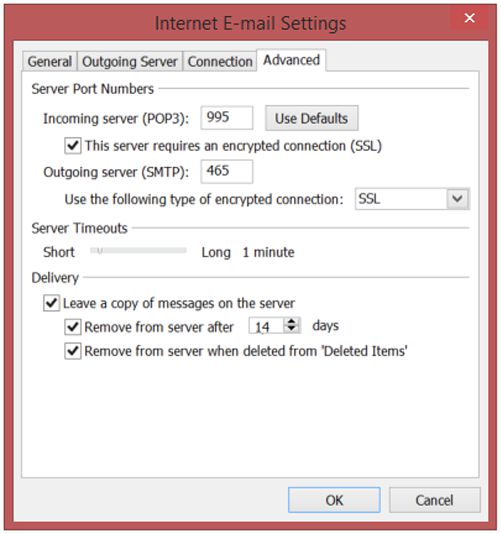
Open Outlook, click the TOOLS menu, and select EMAIL ACCOUNTS Choose the appropriate situation: If you’re adding an email account to this Outlook click NEW… and click Next. Check the box next to MANUALLY CONFIGURE SERVER SETTINGS OR ADDITIONAL SERVER